Log · Triage · Vendor handoff · Tenant updates
Free Rental Property Maintenance Log Template for Landlords (Google Sheets)
This is a free rental property maintenance log template, built in Google Sheets, for landlords who self-manage their own units. One row per repair request: when it came in, which unit, what's wrong, the priority, the vendor, the cost, and the proof it got done. Around the log sits a small system — an emergency-vs-routine triage checklist, a copy-paste vendor work order, and ten tenant update messages.
Everything is on this page: every tab, every column, the full triage table. No account, no form to view it. Drop your email below and I'll send you the whole kit.
Get the full kit by email
Free · email onlyThanks.
Want it right now? Copy the workbook straight into your Google Drive:
Prefer Gumroad? Get the same kit free there — name a fair price if you feel like it, $0 is fine.
Inside the workbook: a five-tab maintenance tracker spreadsheet
Most "maintenance log" downloads are a single blank grid. This one is a small workbook — a rental property maintenance tracker spreadsheet with five tabs that work together:
- Start Here — setup notes, a safety and local-law note, and quick instructions. Read it once, then ignore it.
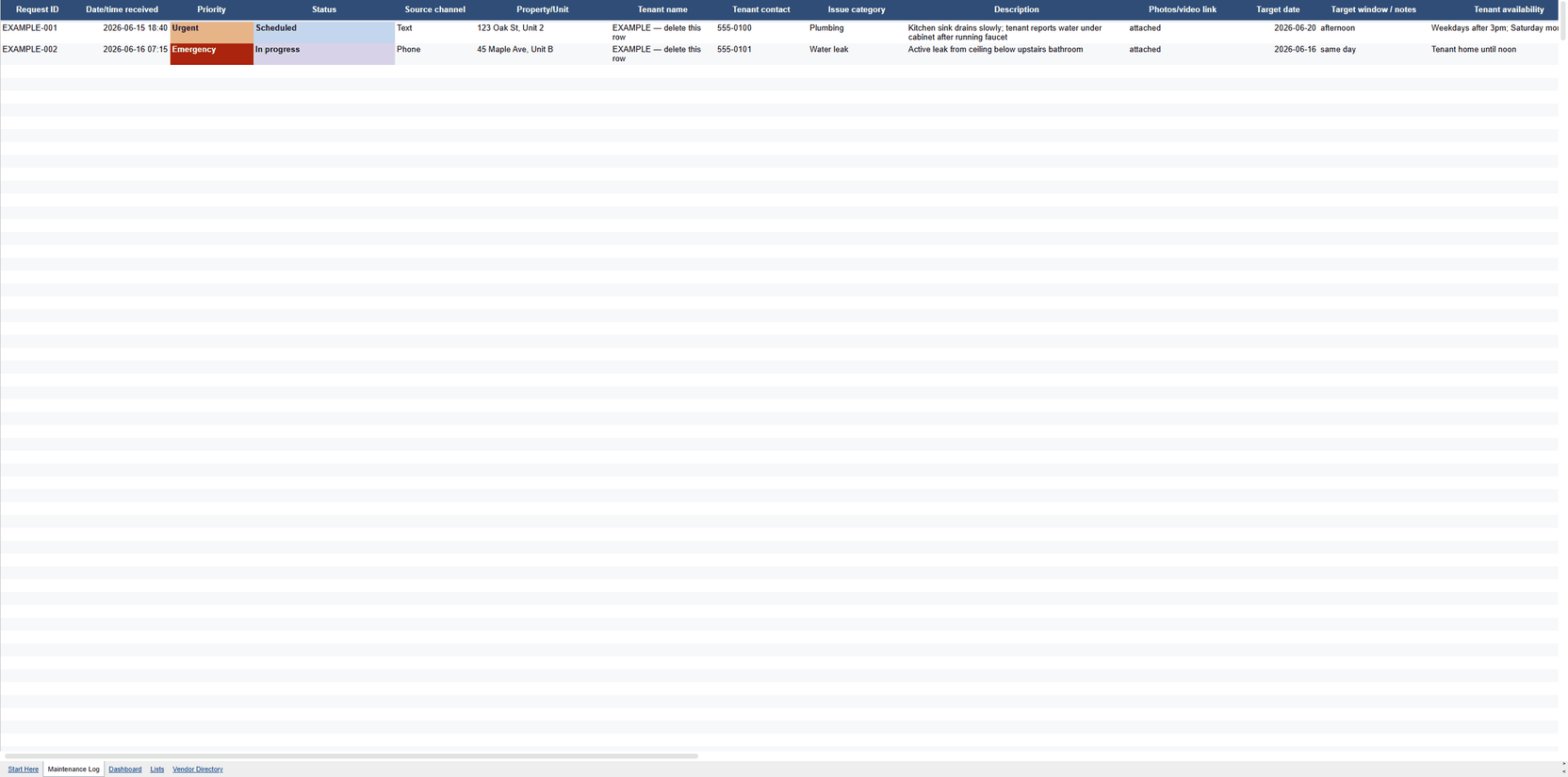
- Maintenance Log — the main tracker. One row per request, 30 columns from intake to closeout, with dropdowns for priority, status, source channel, issue category, vendor confirmation, owner approval, and tenant confirmation. Two example rows show how a real urgent plumbing request and a real emergency leak look when logged — delete them and start typing.
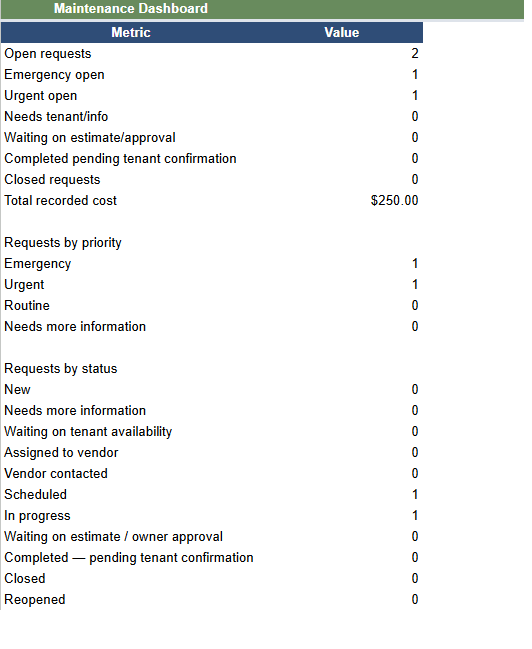
- Dashboard — summary counts for open requests, priorities, statuses, and recorded cost. Open it Monday morning and you know where things stand without scrolling the log.
- Lists — the dropdown values the log uses. Edit these to match your own statuses and vendors; don't delete the tab.
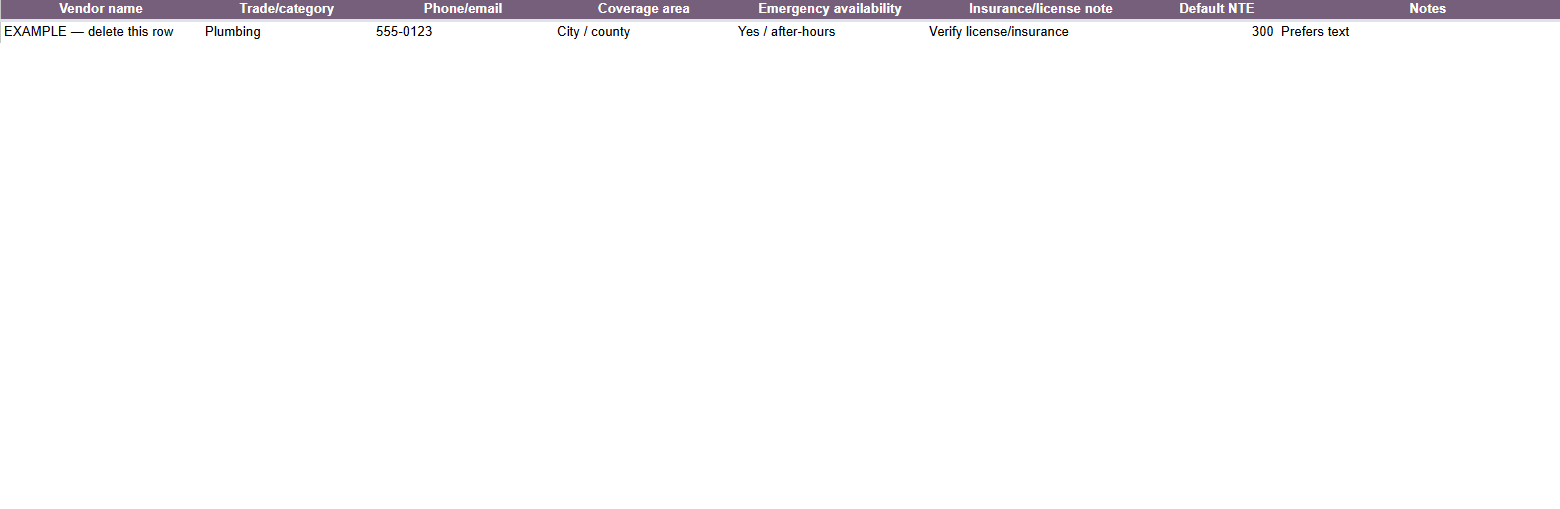
- Vendor Directory — an optional reference list so your plumber's number lives next to the log instead of in a five-year-old text thread.
Column by column: what to track and why
Thirty columns sounds like a lot. In practice you fill most of them in under a minute, and each one exists because skipping it costs you later. Grouped by what they do:
Intake — capture the request once, completely.
Request ID · Date/time received · Source channel · Property/Unit · Tenant name · Tenant contact · Issue category · Description · Photos/video link
The date/time stamp and source channel matter more than they look: "reported by text on the 15th at 6:40pm" is the line that usually settles disputes about how fast you responded.
Triage and scheduling — decide what happens and when.
Priority · Status · Target date · Target window / notes · Tenant availability · Access notes
Priority is a dropdown — Emergency, Urgent, Routine, Needs more information — and the triage checklist below tells you which to pick. Access notes ("lockbox on side door, small dog, street parking") are what stop the failed-visit-and-reschedule loop.
Vendor — hand it off without phone tag.
Vendor assigned · Vendor contact allowed · Vendor confirmed · Date assigned to vendor · Vendor arrival/window
"Vendor contact allowed" is the sleeper column: recording whether the vendor may coordinate with the tenant directly removes you as the middleman for scheduling — or keeps you in the loop when the tenant prefers that.
Money and approval — no surprise invoices.
NTE amount · Owner approval required · Cost
NTE is the not-to-exceed amount you give the vendor: "fix it up to $300, call me before going over." If you manage for owners, the approval column is your record that you asked before spending their money.
Closeout and communication — prove it happened.
Completion date · Completion proof · Tenant confirmed · Next follow-up date · Last tenant update sent · Closeout notes · Notes
A repair isn't done when the vendor says so; it's done when there's a completion photo or invoice on file and the tenant confirms the problem is gone. "Last tenant update sent" is the column that kills the "any update??" text — you always know when you last wrote and what you promised next.
Want this in your inbox?
The workbook plus the triage checklist, vendor handoff, and tenant message templates — free, email only.
How to track tenant maintenance requests, step by step
The spreadsheet is the artifact. The workflow is what makes it work. Here is how to track tenant maintenance requests with this kit, from first text to closed file:
Last tenant update sent.Emergency vs. urgent vs. routine: triage every request in 60 seconds
The expensive mistakes in maintenance are usually triage mistakes: treating a burst pipe as routine, or dispatching an after-hours plumber for a dripping faucet. The kit includes a one-page triage checklist that sorts any request in about a minute.
Response-time targets vary by lease, local law, and season, but common practice across the industry looks like this:
| Tier | Response target | What it covers | First move |
|---|---|---|---|
| Emergency | Under 1 hour | Fire, smoke, gas smell, CO alarm; active leak or flooding; sewage backup or no working toilet in a single-bath unit; electrical hazard; unit can't be secured; no heat/water/power where legally required; active property damage | Act now — call your emergency vendor, tell the tenant what's happening. Log it after the calls, not before. |
| Urgent | Within 24 hours | Affects daily living or will get worse, but no active danger: controlled or recurring leak, failed appliance, HVAC outside emergency conditions, pest or moisture issues needing assessment | Schedule a vendor window, tell the tenant when to expect news |
| Routine | 7–14 days | No safety, habitability, or damage risk: slow drain, dripping faucet, loose handle, cosmetic damage, one non-essential fixture down | Set a target date, batch with other visits where possible |
The checklist has a fourth tier the response-time charts skip: Needs more information. If you can't tell from the message whether that "water thing" is a drip or a flood, don't guess a priority — same day, ask for a photo, the exact location, when it started, and whether it's getting worse. Then triage properly.
One rule above the whole table: for fire, smoke, gas smell, a carbon monoxide alarm, or any active danger, the tenant calls emergency services first. Nobody waits on a spreadsheet.
Vendor handoff: turning a log row into a work order
The gap between "I texted my plumber" and an actual work order is where money leaks. A vague handoff produces phone tag, a failed first visit, and an invoice you didn't expect. The kit's vendor handoff template turns a log row into a message a vendor can act on in one read:
- Work order ID — the same Request ID as the log row, so the invoice that comes back matches the record you keep.
- Priority and issue — what's wrong, when it started, photos attached.
- Tenant availability and access notes — days and times that work, lockbox code, pets, parking, whether the tenant must be home. The single biggest cause of failed visits is missing access details.
- Tenant contact permission — whether the vendor may coordinate arrival with the tenant directly.
- Not-to-exceed amount — "up to $300; call or text before exceeding." One line, and the surprise-invoice conversation never happens.
- Confirmation ask — the message ends by asking the vendor to confirm they'll take the job and give an arrival window. No confirmation logged means the job isn't actually assigned.
- Closeout requirements — what you need back: diagnosis, completion photo, invoice with the work order ID on it.
Send it, then record the vendor's reply in the log: Vendor confirmed, Vendor arrival/window. The template ships with a filled example so you can see what a complete handoff reads like before you write your first one.
Spreadsheet vs. property management software: an honest take
Here's the part where most pages like this pivot to selling you software. The honest version:
A spreadsheet is enough for a lot of self-managing landlords. If you run a handful of units, requests arrive at a pace one person can handle, and you have the discipline to log things when they happen, this workbook plus the checklist covers intake, triage, vendor handoff, tenant updates, and history. It's free, there's nothing to adopt, your tenants don't install anything, and you own the data.
Where it breaks is not unit count — it's discipline at volume. Every request still has to be retyped from a text or a voicemail into a row. The Next follow-up date column only works if you're the kind of person who checks it. Nothing reminds you a vendor never confirmed. Tenants still text "any update?" because the log is yours, not theirs. And after-hours triage still happens on your phone, from memory, at 11:47pm. Full property-management platforms solve this, but they bundle it with rent collection, accounting, and tenant portals — a lot of software when maintenance is the only part that hurts.
What I'm building. I'm Denis. I build software; I'm not a landlord. This template comes out of reading how landlords describe handling repair requests in forums and community threads, and the same pattern keeps coming up: the tools are either a manual spreadsheet or a full platform, with nothing in between. So I'm building a maintenance-only triage inbox — requests come in by the text and email channels tenants already use, get logged and triaged automatically, and the vendor handoff and tenant updates happen from one place. It doesn't exist yet; I'm validating whether it should. If the "where it breaks" list above sounds like your week, see what I'm building and join the waitlist — and if you tell me how you handle maintenance today, I read every reply.
Frequently asked questions
- Is this template really free?
- Yes. Everything is visible on this page — the tabs, all 30 columns, the triage table. Email gets the full kit delivered; the Gumroad version is pay-what-you-want with a $0 minimum. To copy the workbook into your own Drive you'll need a Google account, but that's Google's requirement, not a signup wall of ours.
- Is it Google Sheets or Excel?
- The workbook is built for Google Sheets — dropdowns, dashboard, and vendor directory ready to use. If you prefer Excel, download a copy from Sheets (File → Download → Microsoft Excel); most of it survives the trip, and the setup guide lists every dropdown value in case you need to rebuild one.
- What should a landlord maintenance log include?
- At minimum: date received, unit, tenant contact, issue description, photos, priority, status, vendor, cost, and completion date with proof. This template's 30 columns add the fields that prevent disputes and failed visits — access notes, not-to-exceed amount, owner approval, tenant confirmation, and when you last updated the tenant.
- How long should I keep maintenance records?
- There's no single answer — it depends on your jurisdiction, lease, and taxes. A common approach is to keep records at least through the tenancy plus your local statute-of-limitations window, and as long as your tax records (often several years). Storage in a spreadsheet is effectively free, so when in doubt, keep them. Not legal advice — check your local rules.
- What counts as an emergency repair?
- Anything with active danger or active damage: fire, smoke, gas smell, a carbon monoxide alarm, flooding or an uncontrolled leak, sewage backup, no working toilet in a single-bath unit, an electrical hazard, a unit that can't be secured, or loss of heat, water, or power where it's legally required. For immediate danger, the tenant calls emergency services first. The included checklist walks through this in order.
- Do I need property management software for 5–20 units?
- Not necessarily. Plenty of landlords in that range run maintenance on a disciplined spreadsheet exactly like this one. Software starts earning its cost when the manual parts fail — requests slipping through, follow-ups missed, tenants asking for updates you can't find. If the spreadsheet works, keep the spreadsheet.
Get the maintenance log kit
The Google Sheets workbook, the triage checklist, the vendor work order, and ten tenant update messages. Free — just your email.
Prefer Gumroad? Grab the same kit there — free, name a fair price if you want.